Automatic Event Tracking
Capture key interactions out of the box, no setup required.

SpectraJS.com
Spectra captures what users do on your site right out of the box, from clicks to form submissions. Enjoy performance-first tracking and get insights in real-time using your favorite dashboard.
Features
Understand how your site performs while respecting user privacy at every step.
Capture key interactions out of the box, no setup required.
Lightweight script designed for fast load times and minimal resource usage, with intelligent event queuing.
Define and track custom events with straightforward logging.
Send your data anywhere—use the visualization tools your team already prefers.
No cookies, no form values captured, no IP addresses, no fingerprinting. Anonymous user data aggregated for analytics—nothing tied to a real name.
Team members generate personal links to share with prospects. Activity is anonymously attributed to the sender — no sign-in required from the prospect.
Attributions
Account members can generate personal links to share with prospects. When someone opens your link, their anonymous session is tied to you for the next 30 days—no sign-in required from them.
Attribution links can empower your sales team to track the source of new business. Team members can see the revenue each prospect generates.
Step 1
Any team member creates a personal attribution link in the Spectra dashboard.
Step 2
Send the link to a prospect. It includes an embedded attribution token in the URL.
Step 3
When they visit, their anonymous session is attributed to that member. Activity shows up in the Attributions report.
Attribution is session-based and anonymous: Spectra does not capture personally identifiable information from prospects or link their activity to a real name.
Log in to your Spectra dashboard and go to settings. Scroll down to the "Sharable Links" section and enter the URL that you want to share with the user. Click "Generate Link" and you're done.
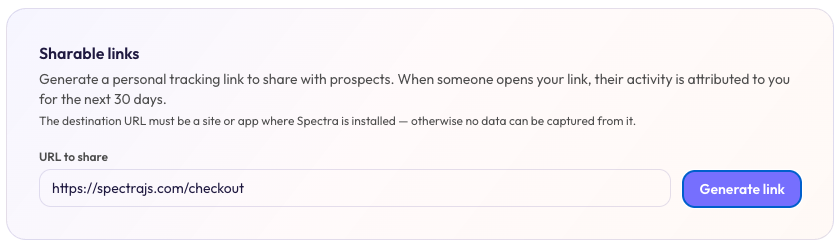
Copy & paste the URL that you want to share into the "URL to share" field.
Then click "Generate link" and Spectra will generate a link for you.
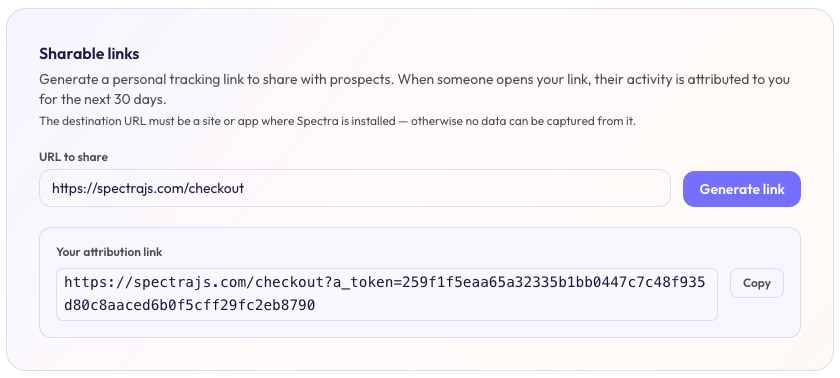
Copy the URL generated by Spectra and share it with your prospect. You will notice an attribution token gets added to the URL.
When the prospect visits the URL, their session will be tied to you for the next 30 days. You can see the activity in the Attributions report in your Spectra dashboard.
Why Teams Choose Spectra
Pricing
Choose predictable billing with Spectra, or deploy the open source stack on your own infrastructure at your own cost.
Fully managed analytics with predictable billing- no servers to run.
$2,499/yr
Get SpectraOpen source
FREE
Self hosted infrastructure
Same core product: you operate the tracker, server, and data store. Full control over data & infrastructure, no vendor lock-in.
View on GitHubFAQs
Contact Us
Tell us about your site and team goals. We will help you choose the right plan and get tracking live quickly.